
Android 15 changed the distribution rules for every app on Google Play. Any app targeting an outdated API level now risks removal or reduced visibility, regardless of how well it performs on device.
This guide covers exactly what Android API Level 35 means for your app, what Google now requires, and how to bring your build into compliance, whether you work in Android Studio, update manually, or build on a no-code platform that handles it for you. See the full Android API Level 35 platform requirements on the official developer site.
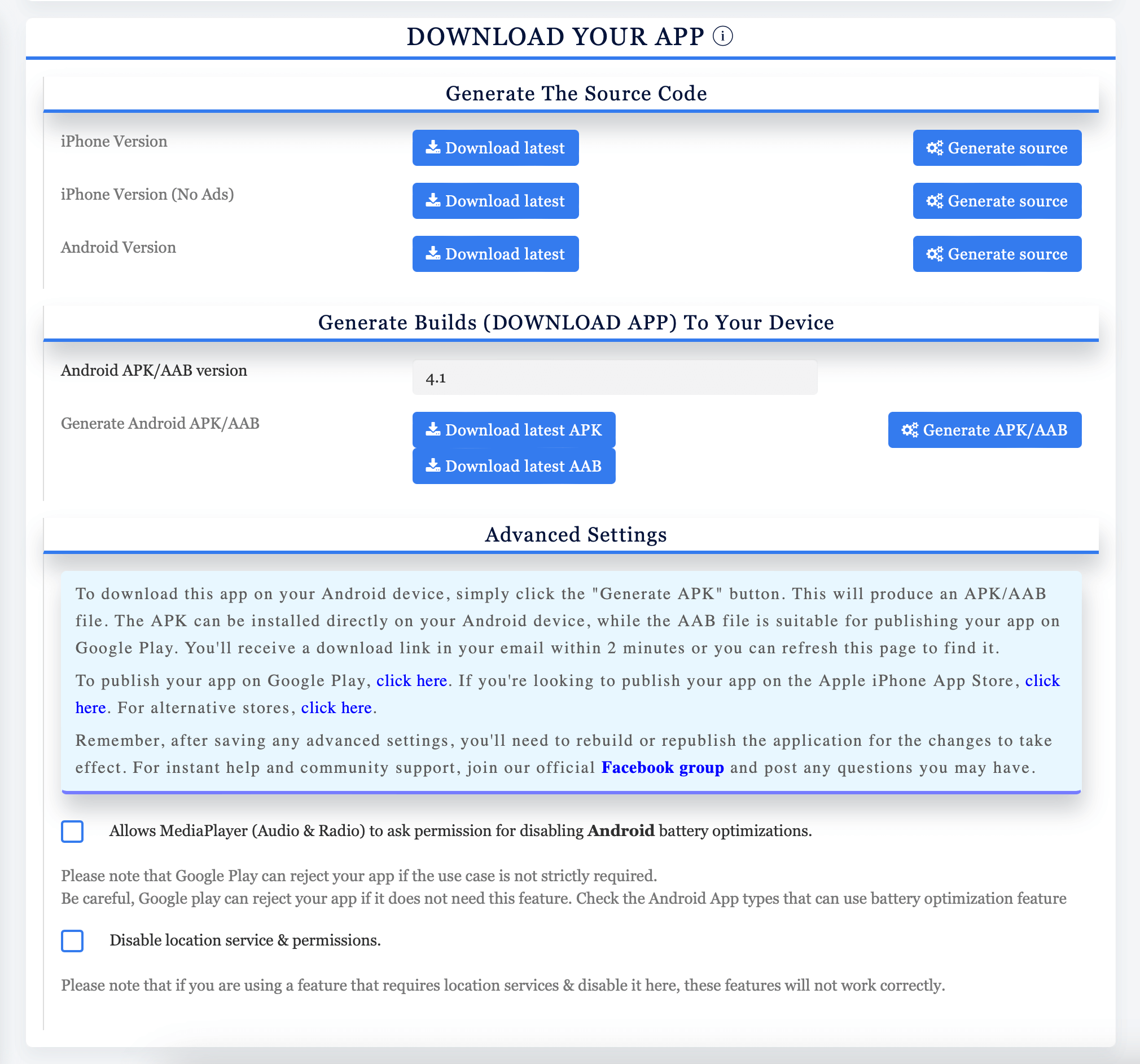
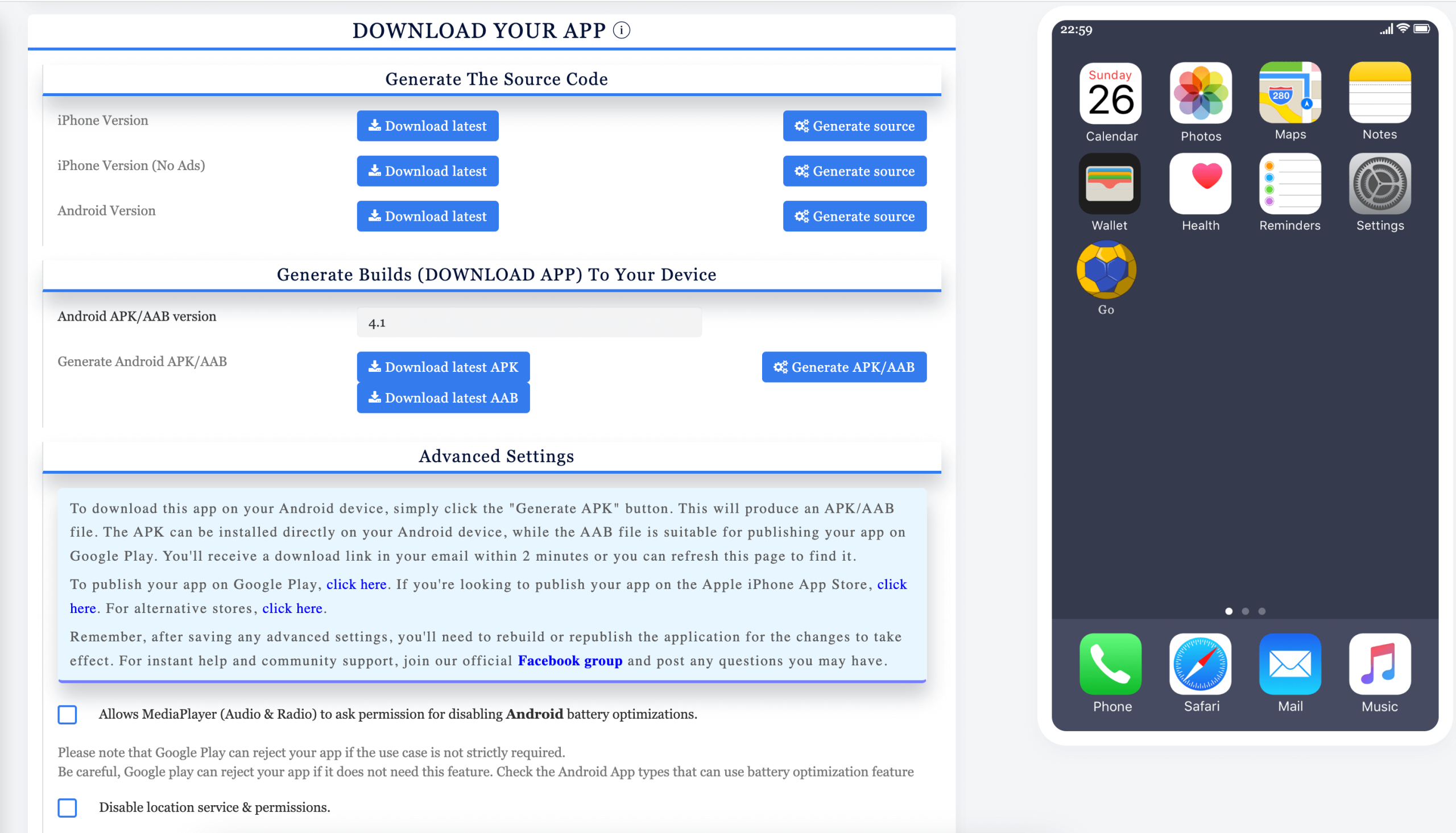
Appbuilder24 handles API Level 35 compliance automatically for apps built on the platform. The quarterly build system updates mean your app’s compilation target is already set correctly. If you built your app here, skip the Android Studio steps further down this page: log in to your Appbuilder24 dashboard, generate a fresh AAB file from the Download tab, and resubmit it to your preferred app store. The screenshot below shows exactly where to find that option:
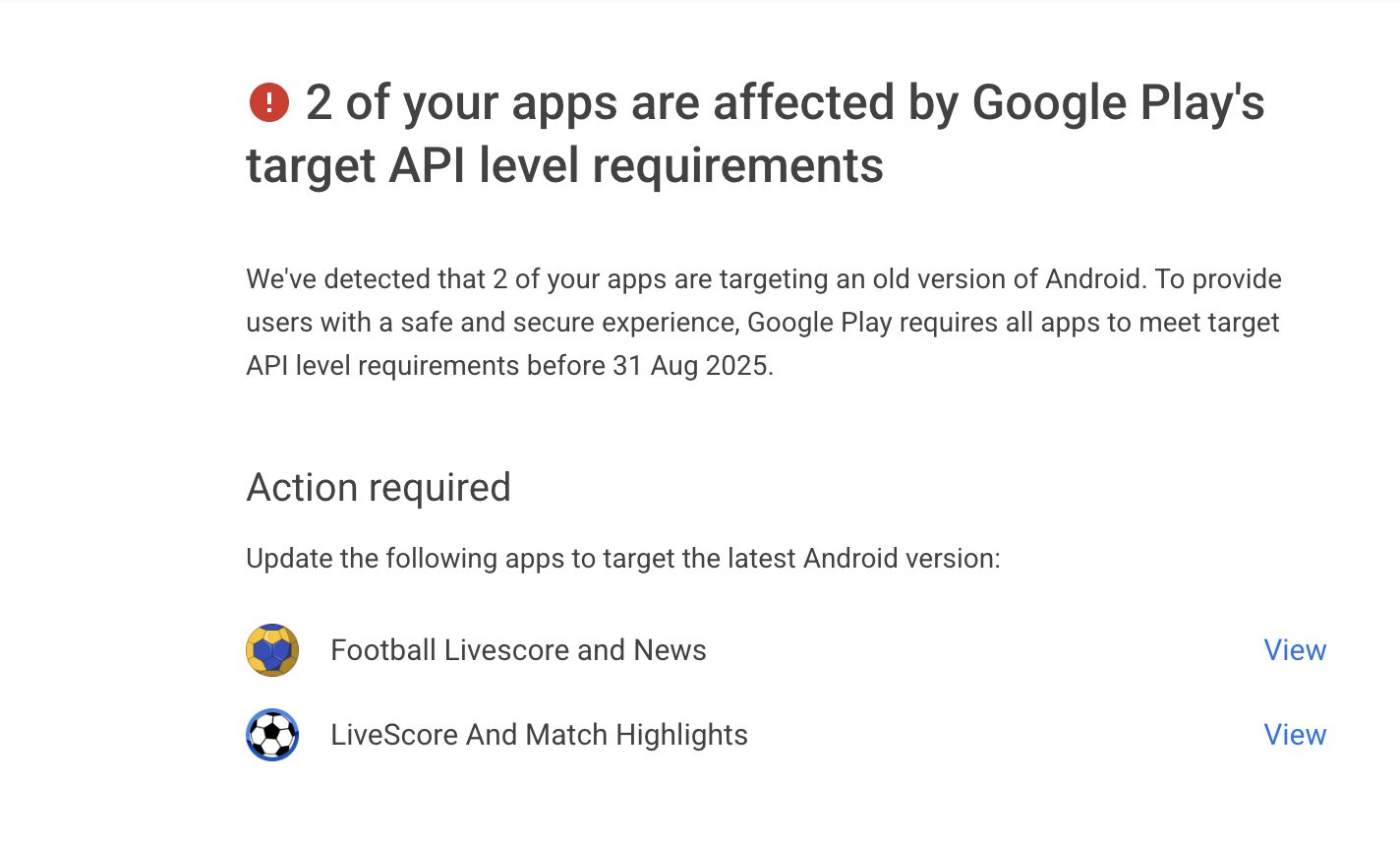
Here is what Google’s official policy states, effective August 2025:
Starting August 31 2025:
- New apps and app updates must target Android 14 (API level 35) to be submitted to Google Play (except for Wear OS and Android TV apps, which must target Android 13 or higher).
- Existing apps must target Android 13 (API level 34) or higher to remain available to new users on devices running Android OS higher than your app’s target API level. Apps that target Android 13 (API level 32) or lower ( Android 11 or lower for Wear OS and Android 12 or lower for TV OS), will only be available on devices running Android OS that are the same or lower than your apps’ target API level.
You will be able to request an extension to November 1, 2025 if you need more time to update your app. You’ll be able to access your app’s extension forms in Play Console.
Compliance requirements by app type
| New apps | Existing apps |
| When you publish a new app, you must target Android 15 (API level 35) or higher. | If your existing app targets Android 14 (API level 34) or higher, then your app is compliant with this policy.If your existing app’s target is lower than Android 14 (API level 34), it will stop being available to all new users whose devices run Android OS versions higher than your apps’ target API levels, as your app wasn’t built to meet the safety and quality standard that these users expect from newer Android OS versionsIf you plan to update this app to a higher target API level, you can submit an extension request to continue getting distributed to all users on Google Play until November 1 , 2025. Impacted apps will receive extension request form link via Play Console Inbox message.When you update your app, you must target Android 15 (API level 35) or higher. |
Wear OS app requirements
| New apps | Existing apps |
| When you publish a new Wear app, you must target Android 14 (API level 34) or higher. | If your existing Wear app targets Android 13 (API level 33), then your app is compliant with this policy.If your existing app’s target is Android 11 (API level 30) or Lower, it will stop being available to all Google Play users whose devices run Android OS versions newer than your apps’ target API level, as your app wasn’t built to meet the safety and quality standard that these users expect from newer Android OS versionsIf you plan to update this app to target Android 14 (API level 34) or higher, you can submit an extension request to continue getting distributed to all users on Google Play until November 1 , 2025. Impacted apps will receive extension request form link via their Play Console Inbox message.When you update your app, you must target Android 14 (API level 34) or higher. |
Android TV requirements
| New apps | Existing apps |
| When you publish a new Wear app, you must target Android 14 (API level 34) or higher. | If your existing Android TV app targets Android 13 (API level 33), then your app is compliant with this policy.If your existing app’s target is Android 12 (API level 31) or Lower, it will stop being available to all Google Play users whose devices run Android OS versions newer than your apps’ target API level, as your app wasn’t built to meet the safety and quality standard that these users expect from newer Android OS versions.If you plan to update this app to target Android 14 (API level 34) or higher, you can submit an extension request to continue getting distributed to all users on Google Play until November 1 , 2025. Impacted apps will receive extension request form link via their Play Console Inbox message.When you update your app, you must target Android 14 (API level 34) or higher. |
Android Automotive OS requirements
| New apps | Existing apps |
| When you publish a new Android Automotive OS app, you must target Android 14 (API level 34) or higher. | If your existing Android Automotive OS app targets Android 12L (API level 32) or higher, then your app is compliant with this policy.If your existing app targets Android 12 (API level 31) or lower, it will stop being available to all Google Play users whose devices run Android OS versions newer than your apps’ target API level, as your app wasn’t built to meet the safety and quality standard that these users expect from newer Android OS versionsIf you plan to update this app to target Android 14 (API level 34) or higher, you can submit an extension request to continue getting distributed to all users on Google Play until November 1 , 2025. Impacted apps will receive extension request form link in their Play Console Inbox message.When you update your app, you must target Android 14 (API level 34) or higher. |
Apps that fall below the API Level 33 floor are removed from Google Play entirely, not merely restricted to a subset of users. Full details are in Google’s support documentation. Targeting API 35 puts you one full version above the current minimum, which gives you a reasonable runway before the next requirement change.
👉🏾 Other Appbuilder24 users have read: Appbuilder24 App Maker: Build an app for free without Coding
API Level 35: What You Need to Know
How to Update Your SDK and App To Target Android API Level 35
Google Play now requires API Level 35 for all new submissions and updates. The steps differ slightly depending on whether you update through Android Studio or take the manual route, but both follow the same core logic.
Updating Android SDK via Android Studio
- Open Android Studio: Load the project you plan to submit or update. This applies to both existing Play Store apps and new builds you are preparing for first submission.
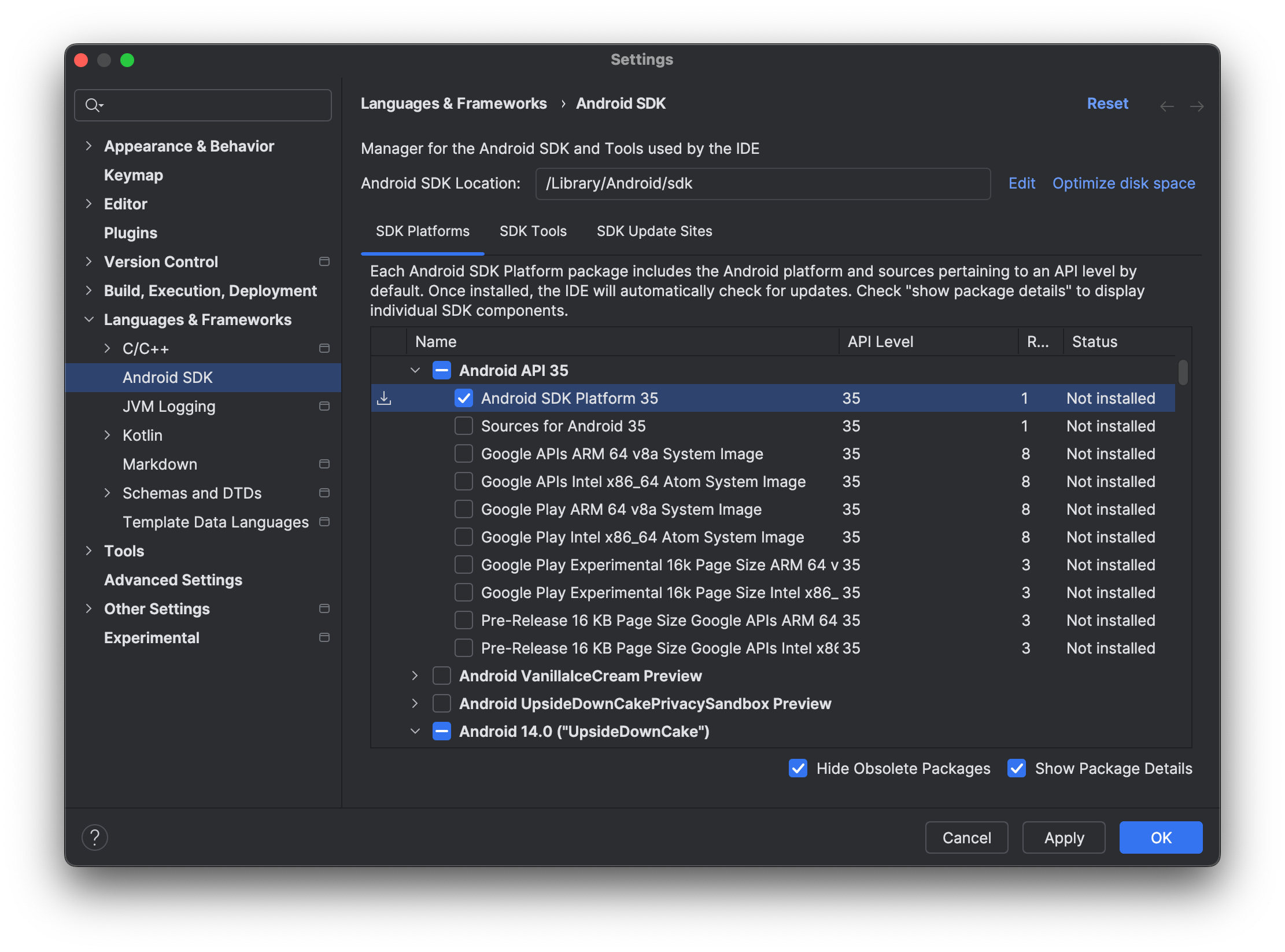
- Open SDK Manager: From the top menu, go to
Toolsand selectSDK Managerto access Android platform settings. - Select the Platform: Inside the
SDK Platformstab, scroll toAndroid 14 (API level 35)and check the box next to it. - Install: Hit
Apply, confirm withOK, and let Android Studio fetch and install the selected platform files. - Edit build.gradle: In your app module’s
build.gradlefile, set bothcompileSdkVersionandtargetSdkVersionto 35. - Sync the Project: Click
Sync Nowwhen Android Studio prompts you, or trigger a sync manually from the toolbar to apply the updated gradle configuration.
Manually Updating Android SDK
- Get the SDK Package: Download the API level 35 package from the Android developer site. Alternatively, pull it through the SDK Manager inside Android Studio if you have it installed.
- Unpack It: Extract the downloaded archive to a folder you can easily reference from your development environment.
- Update PATH: Add the full path to the extracted SDK folder to your system’s
PATHenvironment variable so build tools can find it. - Point Your Project at the New SDK: Open your project configuration and update the SDK location to match the folder where you extracted the package.
- Update build.gradle: Same as the Android Studio path, change both
compileSdkVersionandtargetSdkVersionto35in your app module’s gradle file. - Rebuild: Run a clean build to apply all changes and catch any compatibility issues introduced by the new target level.
The Importance of Android API Level Compliance
Keeping your app’s API level current is a practical necessity, not a formality. Each new Android API level introduces refined permission models, updated security policies, and behavioral changes that affect how apps run on modern hardware. Targeting API 35 gives your app access to the latest platform capabilities and ensures it behaves predictably across current Android devices. It also keeps your Play Store listing active and fully visible to new users.
👉🏾 Other Appbuilder24 users have read: From Features To Preferences: What Android And IOS Users Really Care About
The Risks of Non-Compliance with Android API Level
The consequences of non-compliance are concrete. Google removes apps that fall below the minimum threshold from Play Store search results for users on newer Android versions. For any developer monetizing their app, that means a direct drop in reach and revenue, with no warning to existing users that the app has become restricted.
Apps that stay above the removal threshold but still target an outdated API level lose ranking signals in Play Store search, reducing organic installs. At the same time, older target API levels leave known security gaps unpatched, creating genuine risk for anyone using your app.
The Role of Testing in API Compliance
Before shipping an API level update, run it through a full testing cycle first. Targeting a new API level can change how your app handles file storage, background processes, notification permissions, and location access, all areas where Android has tightened its behavior in recent versions.
Test on both an emulator configured for API 35 and real Android 14 or 15 devices. Walk through every major user flow, especially anything involving permissions, media access, or background tasks, since these are where API-level changes most commonly surface unexpected behavior.
Appbuilder24: Best Android App Builder Platform (Automated Updates)
For developers who would rather skip SDK management entirely, Appbuilder24 handles the full compilation stack through its Android App Builder. The platform abstracts away gradle configuration, SDK versioning, and build toolchain maintenance, so you can focus on the product instead of the pipeline.
With Appbuilder24 you can build a custom mobile app from ready-built templates or a blank canvas, adding from a full library of app features without writing code. Getting started is free.
Make an app with Appbuilder24 App
Create premium apps without writing a single line of code, thanks to our user-friendly app builder. Build an app for your website or business with ease.
SDK maintenance is one of the bigger time costs in traditional Android development. On Appbuilder24, it disappears. When Google updates its target API requirements, the platform updates its build system and every app automatically uses the new target the next time you regenerate a build.
The process for Appbuilder24 users is straightforward: open the editor, go to the Download tab, regenerate your APK or AAB file, and upload the result to Google Play Console. No gradle edits, no SDK manager, no version pinning.
Every app built on Appbuilder24 stays current with Google’s platform requirements without the developer needing to track Android release schedules or manage build configuration independently.
If you have questions during the update process, Appbuilder24’s knowledge base covers the most common scenarios, and the support team is available when you need to go deeper.
Appbuilder24 App Builder Key Improvements and Bug Fixes for the Year 2025
Android-Specific Updates
- APPS > ANDROID: The target SDK has been increased to level 35 to align with Google’s new requirements.
Caching Enhancements
- APPS > CACHING: We’ve optimized the application cache to pre-load certain parts after a cache clears, ensuring faster app load times.
Debug and Validation Features
- DEBUG FEATURE > FORM V2: You can now set the step/increment to 0 to disable validation.
- FEATURE > AUDIO: The remote media URI validator has been improved for better performance.
Session Management
- SESSIONS: The Redis session option has been removed due to compatibility issues with the latest updates. MySQL is now the enforced session management system, and it’s more efficient than ever.
Mobile-E-Commerce and Layout Fixes
- FEATURES > M-COMMERCE: We’ve fixed the order options pricing display on PDFs.
- APP > CSS > LAYOUT 18 and GENERAL: Various CSS position issues on Android devices and title overlapping issues in landscape mode have been resolved. We also re-add the woo-commerce app builder feature reintegration.
👉🏾 You can also read: How to make money from apps Using Fremium app monetization
Push Notification Migration
Push notifications have been migrated to OneSignal for a more efficient and cost-effective experience. You can set it up using this article.
How to Update Your App to target new android API level
To generate an API Level 35-compliant build on Appbuilder24, sign in to your account and open your app in the editor. Navigate to the Download tab and scroll to the Android build section. Generate a new AAB file and upload it to Google Play Console through the standard submission flow.
Android’s API requirements will keep advancing with each major release. Tracking those changes manually and updating your build pipeline each time is a maintenance burden that grows over time. Appbuilder24 is designed to absorb that overhead so your development time goes into building what users actually experience, not into maintaining a build system.



Thanks for this prompt udate
Hi hello every one
Hello Maxmud
very informative
Thank you