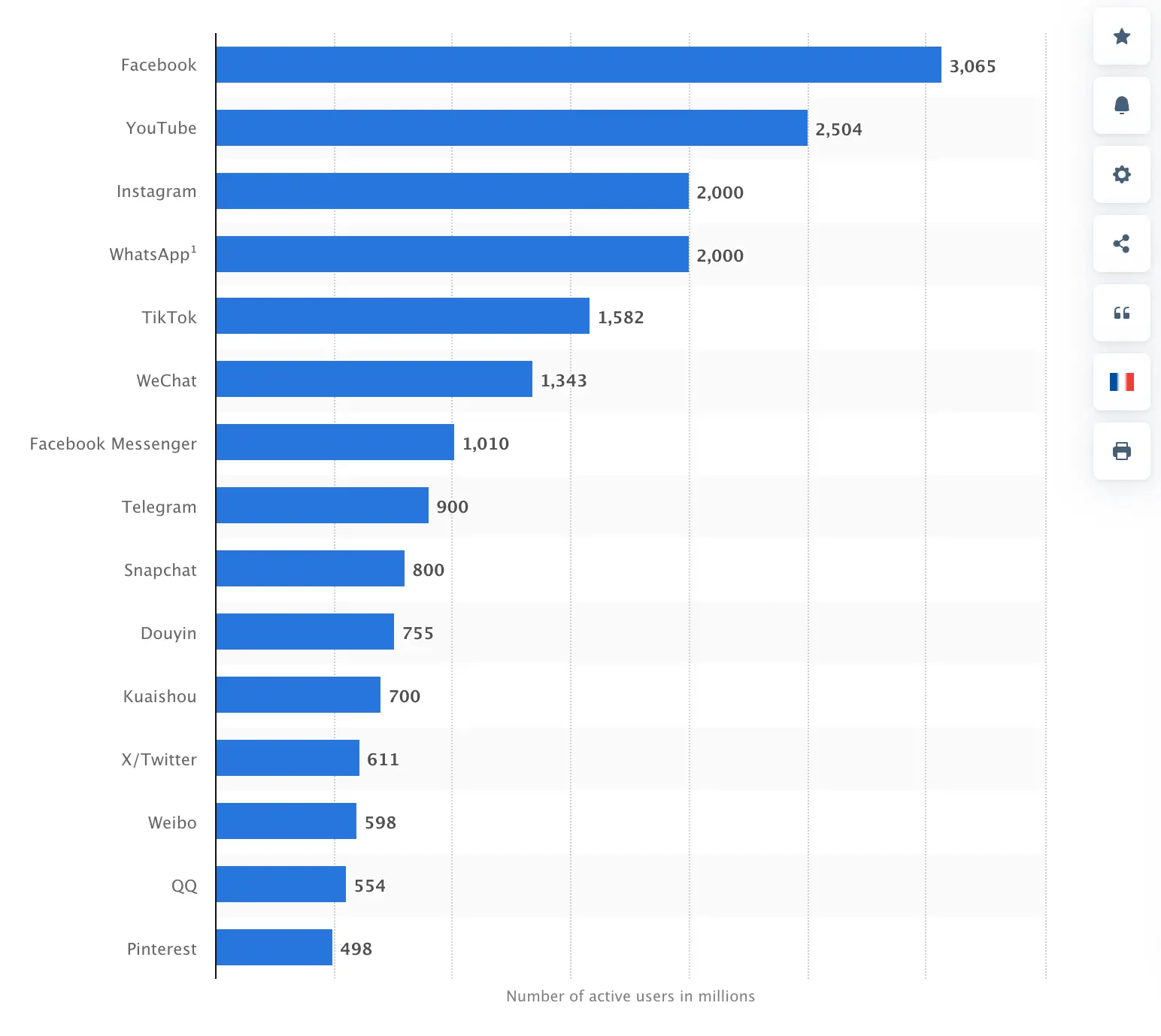
WhatsApp is the most widely used messaging app in the world, with well over two billion active users across more than 180 countries. Understanding what it actually takes to build an app at that scale, and at any scale, starts with a clear-eyed look at the features involved and the engineering hours behind them.
To put the scale in context: WhatsApp processes over 100 billion messages per day. Facebook Messenger handles around 1.3 billion monthly active users, and Skype maintains approximately 300 million. Building at WhatsApp’s level is one of the most technically demanding projects in consumer software, but understanding the architecture helps clarify what any messaging app needs to function.
The goal here is not to build a WhatsApp clone but to understand what features define a functional messaging app and what each one costs in development time. Knowing the engineering footprint of each feature helps you make informed decisions about scope, team size, and budget.
Building a successful messaging app requires a realistic understanding of both what you are building and what the development will cost. Mobile is one of the most valuable distribution channels available, and a well-executed messaging app can generate significant network effects once it reaches a critical mass of users.
Before looking at the cost estimates, it helps to understand how WhatsApp was built and what made it technically distinctive. That context explains why development time and costs for a similar app fall in the ranges they do.
WhatsApp History
WhatsApp was founded in 2009 by Brian Acton and Jan Koum, both former Yahoo employees who left the company in 2007. While building WhatsApp, Acton applied for a position at Facebook and was rejected. Five years later, Facebook would acquire the company he helped build for $19 billion, making that rejection one of the more consequential hiring decisions in tech history.
In February 2014, Facebook completed the acquisition of WhatsApp for $19 billion, at the time the largest acquisition of a venture-backed company ever recorded.
A company reaching that valuation five years after founding reflects how defensible network-effect products become once they achieve scale. Any messaging app aspiring to serve a large audience is committing to significant infrastructure investment over time, not just initial development costs.
The company raised $250,000 in seed funding from former Yahoo colleagues in its early days. That initial capital seeded a product that, by the time of its acquisition, had achieved a user base and infrastructure that justified one of the largest exits in consumer technology.
The growth was not instant. WhatsApp built its user base over years through word of mouth, cross-platform availability, and a clear focus on reliable, fast messaging above all else.
How WhatsApp Works Technically
WhatsApp routes all communication over an internet connection, whether Wi-Fi or mobile data. This eliminates per-message SMS charges, which is particularly significant for international communication where carrier rates are high.
WhatsApp’s technical reputation rests on three properties: message delivery reliability, end-to-end encryption, and the simplicity of phone number-based authentication. Users do not manage usernames or passwords, which removes one of the most common friction points in app adoption.
Registration is tied to the user’s phone number, which serves as a unique identifier. The system then pulls contacts automatically from the device’s address book, which is a core reason for its viral growth: users discover that existing contacts are already on the platform without any separate invite process.
Status indicators let users communicate availability without sending a message. Competing platforms including Telegram, Signal, and LINE offer similar functionality, which has become a standard expectation in messaging apps.
The core strength that drove WhatsApp’s adoption is its simplicity: reliable, real-time messaging over any internet connection without requiring users to learn new conventions or manage separate credentials.
This matters particularly for international users. Major carriers in the United States and other markets charge significant rates for international SMS and calls.
Carrier rates for international calls can run $0.49 per minute or more domestically, with international text charges commonly around $0.25 per outgoing message.
WhatsApp removes those costs entirely by routing calls and messages over data. For users in markets where international communication is expensive, this was and remains the single most compelling reason to switch.
What Is The Cost of Building An App Like WhatsApp?
First, Let me Highlight The Features of WhatsApp.
Each feature in a messaging app carries a specific development cost. Understanding what each one requires in engineering hours helps you make realistic decisions about what to build in a first version versus what to add later.
Here is a breakdown of the core features and what each one entails technically:
- Instant Messaging
The foundation of any messaging app is the ability to start a conversation, find a contact, and send a text. This requires contact list integration, a conversation thread interface, and the backend infrastructure to route messages reliably.
Message synchronization across devices is an additional layer of complexity that users now expect as a standard feature.
Messages are delivered over data rather than SMS. Offline users receive queued messages the next time they connect, which requires reliable message delivery infrastructure on the backend.
Text is the baseline. A full messaging app also needs to handle images, audio, video, and documents, each of which requires media storage, compression, and delivery infrastructure.
WhatsApp’s messaging infrastructure is built on XMPP (extensible messaging and presence protocol), which handles real-time message routing and presence indicators.
WhatsApp does not permanently store messages on its servers. Messages are held temporarily until delivery is confirmed, then deleted from server storage. This architecture is both a privacy feature and a way to manage infrastructure costs at scale.
If your app does store messages server-side, encryption at rest and robust access controls are non-negotiable requirements.
- VoIP phone calls
VoIP (voice over Internet protocol) routes voice calls through the internet rather than the cellular network. This is how WhatsApp handles both domestic and international calls at no incremental cost to the user.
A VoIP call uses whatever internet connection is available, whether Wi-Fi or mobile data. Call quality is dependent on connection speed and latency rather than the carrier’s voice network.
WhatsApp calls do not consume call minutes, but they do use data. Users on limited data plans will see consumption, particularly on video calls.
Over Wi-Fi, calls are effectively free from the user’s perspective, regardless of international distance.
VoIP calls in WhatsApp only work between app users. Calls to landlines or non-WhatsApp numbers are not supported, which is a deliberate scope limitation rather than a technical constraint.
- Video chat
Video calling in a messaging app requires the same infrastructure as VoIP with additional video encoding and bandwidth management. Quality degrades with connection speed, so adaptive bitrate streaming is important for a consistent experience.
Like audio calls, video runs over the available internet connection and carries no incremental cost for the user. Implementation complexity is meaningfully higher than audio-only calling.
- Group chats and calls
Group messaging requires the backend to fan out each message to multiple recipients simultaneously while maintaining consistent delivery order and read receipts across all members.
WhatsApp supports groups of up to 256 members, which places significant demands on the message delivery infrastructure, particularly for media attachments that need to be served to many recipients.
Mute controls, group names, and admin permissions are functional requirements that add scope to the group messaging feature. Each adds to the UI and backend work required.
Group video calling is one of the more infrastructure-intensive features to implement. Coordinating real-time video and audio streams for multiple participants simultaneously requires dedicated media server infrastructure and careful session management.
- Geolocation integration
If you have the WhatsApp app installed on your computer, you can share your location with friends in real time. “Live Location” is a function that is currently available.
It is now possible for users to broadcast their current location to their mates, making it simple for them to locate each other for takeoff. If you’re going to be on the move, it’s far better to have a mailing location than supply someone with an address.
Let’s use an example. For example, when you’re walking around in a city, In this case, merely sending your location to a friend would have the effect of making them come to meet you. When you have started traveling, you are free to move where you please rather than only waiting for a certain landmark or meetup venue.
To further ensure users’ protection, you can set a timer for how long you want to share your location. Alternatively, consumers have the option of specifically deleting their location information from someone else’s account.
To use this feature in your Android app, you can use the Google Play location services API. Google developers prefer this process, as opposed to the android.location kit.
When operating with iOS applications, you will be using Apple’s Core Location system for geolocation integration.
- Calendar synchronization
Additionally, the WhatsApp app will interact with the user’s phone calendar. To allow the application, the user only needs to provide permission for the application to access their calendar.
To instantly and conveniently send notifications about dates and times to their calendars, consumers can only click on the notification and pick Add to Calendar. This is also less time-consuming than working through the process manually.
An example of this will be if you use WhatsApp to connect with somebody for business. If you get a message saying to contact them at noon tomorrow, they sent it to you. It just takes a few seconds to include this thing on your schedule. As long as you keep on top of your warnings and recurring incidents, you can still handle them from there.
- Cloud services as Storage
WhatsApp also makes use of cloud technology in a few different ways. We already covered this subject when we previously mentioned how they don’t hold messages on their server. However, while they are incapable of holding anything, users are also able to store items.
The easiest way to complete this mission with a chat app is to connect to the cloud and sync resources. With this progressive feature, it is easier for smartphone users to back up app content to the cloud.
Moreover, cloud platforms provide different alerts, which can use to monitor these notifications. Whenever a WhatsApp user gets a post, gets invited to a party, or gets a notification of some kind, they’ll get a notification sent to their phone.
This is done in what way? Notifications are sent via cloud providers and the HTTP/2 multiplex protocol to the users of the app.
- Chat Encryption
If you’re making a mobile app for mobile phones or tablets, protection still has to be prioritized.
Additionally, as I said earlier, one of the reasons why WhatsApp has seen such widespread popularity is that it is both secure and dependable. End-to-end encryption is used when transmitting messages so that no one can decrypt or change the contents.
The following visualization reveals the stark distinction between end-to-end encryption and other approaches.
For starters, Instagram, Skype, and Twitter are not a true end-to-end framework. This also ensures that the creators of such applications have access to every message received via the platform. Messages in which threats were made can also be accessed by law enforcement.
As you will see, it is not the case for WhatsApp. Only those involved in the conversation have access to the messages on this platform. The WhatsApp creators themselves have no means of knowing the content of messages. An additional explanation why WhatsApp doesn’t keep messages on their server is that they don’t keep a copy.
WhatsApp provides end-to-end encryption. If you try to create a similar app, you’ll probably have to use end-to-end encryption.
- Multimedia file transfers
WhatsApp offers multimedia file transmission as a standard feature. This means that anyone can send all different types of files and data through the app.
- Video
- Image
- Voice
- Animation
- Documents
- Contacts
- Location
- GIFs
Additionally, some of these points have already been addressed, so we don’t need to rehash anything. Each of these files has a different file extension. You would have to include these features if you want the software to run in the same manner as WhatsApp.
To do this, multimedia files can be served by an HTTP server before sending a link to the content, and the Base64-encoded thumbnail is the specified alt-image for the link.
Create an app for free with our app builder
Create premium apps without writing a single line of code, thanks to our user-friendly app builder. Build an app for your website or business with ease.
WhatsApp Cost Breakdown
With the feature scope defined, the development cost estimate comes down to two variables: the number of engineering hours required and the hourly rate of the team you hire.
The numbers below are estimates based on typical project scopes. Your actual costs will vary based on team location, technology choices, your existing infrastructure, and how much you choose to build versus buy.
- Software development team
A messaging app at this level of complexity cannot be built by one person. You need a team covering the following roles at minimum:
- Project manager
- Web developers
- Mobile app developers
- Requirement analyst
- QA engineers
- UI/UX designers
The biggest variable in your total cost is team location. The hourly rate for a software development team in the US can be five to ten times higher than the equivalent in Eastern Europe or South Asia.
Depending on the region you hire from, the blended hourly rate for a full team can range from $10 to $250 per hour, a gap that produces dramatically different final estimates even for the same project scope.
Rather than hiring each role independently, most companies at this scale engage a mobile app development agency that already has these roles staffed and working together. The agency overhead adds cost but reduces coordination risk significantly.
An experienced agency will have handled the technical decisions you would otherwise need months to research, including infrastructure choices, third-party service integrations, and security architecture. Their previous work also gives you a track record to evaluate before committing.
- Hourly breakdown
Development time varies significantly across features. Here are realistic hour estimates for the core components of a WhatsApp-equivalent app:
- Registration and address book: 40 – 50 hours
- Messaging: 150 – 200 hours
- Multimedia file transmission: 30 – 35 hours
- Location: 15 – 20 hours
- Contact sharing: 55 – 65 hours
- Voice and video calls: 150 – 200 hours
- Settings: 80 – 100 hours
- Design (UX/UI): 50 – 60 hours
These are estimates based on typical implementations, not guarantees. The actual hours will shift based on your team’s experience, the tech stack chosen, and how many edge cases and platform-specific behaviors need to be handled.
Based on these ranges, the total development time for a WhatsApp-equivalent app falls between 570 and 730 hours. Using 650 hours as a working average gives us a baseline for cost calculations.
- Total cost
Applying the hourly estimate to regional rates gives you the following cost ranges by development location:
All figures below are based on the 650-hour average and represent blended team rates for each region:
- USA and Canada: $150 per hour = $97,500
- Western Europe and UK: $102.50 per hour = $66,625
- Australia: $100 per hour = $65,000
- Eastern Europe: $85 per hour = $55,250
- India: $45 per hour = $29,250
At the high end, a 730-hour project with a premium US agency at $250 per hour produces a total of $182,500. That figure is realistic for a well-resourced team building to a production-quality standard with no shortcuts.
At the low end, a 570-hour minimum estimate with a $10-per-hour offshore developer produces $5,700. That scenario is not representative of what a production-ready app actually costs at this complexity level, but it illustrates how much the regional rate affects the final number.
Neither extreme is a realistic planning scenario. High-cost agencies at premium US rates will typically deliver higher quality output faster, which partially offsets the hourly premium. Very low-cost developers often require significantly more management oversight and may produce work that requires substantial rework.
Mid-range teams in Eastern Europe and South Asia often represent the best balance of cost, communication, and delivery quality for projects at this scope.
The practical budget range for building a functional, production-quality messaging app with WhatsApp’s core features falls between $29,000 and $97,000 for most development teams, depending on location and experience level.
Using a weighted global average across the regions above, the estimated total development cost for a WhatsApp-equivalent app is approximately $62,000 to $65,000.
That figure covers development only. Marketing, infrastructure hosting, app store fees, and ongoing maintenance are separate costs you should plan for from the start.
Any significant development investment requires a clear path to return. WhatsApp’s original monetization was a simple $1 annual subscription, which scaled effectively to a large user base. After the Facebook acquisition, the revenue model shifted, but the core lesson holds: find a monetization strategy that works at your realistic scale, not at WhatsApp’s scale.
At $1 per user per year applied to even a fraction of WhatsApp’s user base, the subscription model produced substantial revenue. The mechanics are simple; what varies is the scale at which it becomes financially significant.
WhatsApp has tested peer-to-peer payment functionality in India, positioning the messaging platform as a transaction layer between users. For a messaging app, acting as a payment facilitator between parties is a natural extension that creates both revenue and stickiness, since users with payment history tied to a platform are less likely to switch.
WhatsApp has remained ad-free since its acquisition by Facebook, a deliberate choice. If you build a messaging app, in-app advertising is a viable revenue stream, particularly if you have a large and engaged user base and a clear targeting mechanism.
Beyond ads and subscriptions, there are additional app monetization methods worth evaluating. Premium sticker packs, business accounts with enhanced features, API access for developers, and custom integrations for enterprise customers all represent revenue streams that fit naturally within a messaging product.
Conclusion
The clearest answer to the question of what it costs to build a messaging app at WhatsApp’s feature level is: approximately $60,000 to $65,000 at average global development rates, with the range extending from $29,000 for lower-cost regions to $97,500 or more for US-based teams.
That estimate covers the initial build of core features: messaging, VoIP calls, video chat, group conversations, file transfers, geolocation, and end-to-end encryption. It does not cover the infrastructure, maintenance, and marketing costs that come after launch.
Use WhatsApp as a reference point for feature scope, not as the target to match feature for feature. Your first version should contain the minimum set of capabilities that makes the app genuinely useful for your target users. Build that well before expanding.
Competing directly with WhatsApp on general messaging is not a viable strategy for an independent developer. The opportunity is in vertical markets: professional communities, specific countries with underserved communication needs, or use cases where WhatsApp’s general-purpose design creates friction. A messaging app built specifically for healthcare workers, a particular professional guild, or a regional language community can acquire loyal users that a general-purpose app will never prioritize.
Define your niche before you write a line of code. The clearer your intended user is, the more focused your feature set can be, which reduces development scope, cost, and time to market. A monetization plan should be part of the initial design, not something added after the app is built.
For the development itself, working with an agency that has messaging app experience will reduce the research and decision-making overhead significantly. The reusable architectural decisions they have already made for previous clients translate directly into faster delivery for your project.
If you are working out the right scope and budget for your messaging app project, Appbuilder24’s platform can help you launch core features quickly while you validate whether the market exists before committing to a full custom development build.